| |
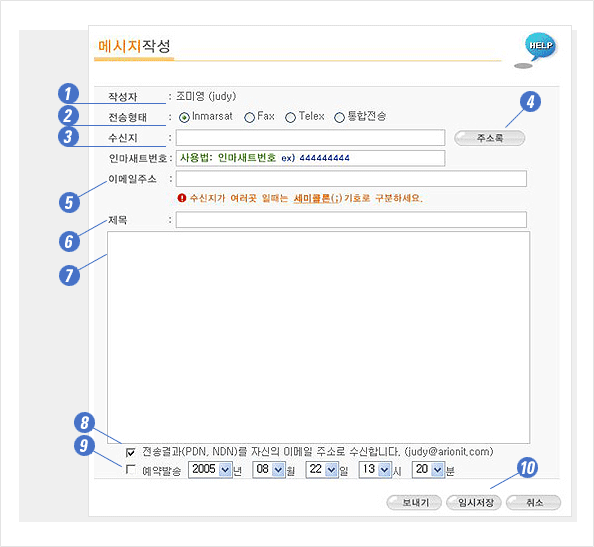
| ①
Creator |
User
name and ID shows automatically when logged on. |
| ②
Transfer type |
Choose
following options: Inmarsat, Fax, Telex, Coordinated wire. |
Put
the number as follows, if you put more than one number,
separate with ;
(Semi colon) |
<Tips
for putting
Numbers in> |
* Inmarsat : 7 or 9 digits of the
ship
* Fax : Country Code + Area code
+ Fax number
* Fax on board : Access Code (870)
+ Ship Fax number
* Telex for land : Country Code
+ Telex number
* Coordinated wire : : When you
send message with more than
2 ways such as Inmarsat and Fax simultaneously.
|
| ③
Receiver |
Put
the name of receiver. Sent message box’s log will update
the receiver.
(It is not sent to the ship.) |
| ④
Address manager |
You
can put the number by choosing receiver from Address manager |
| ⑤
E-mail Address |
Sending
Message to E-mail. (Optional) |
| ⑥
Title |
Put
the Title as you want. Sent message box’s log will update
the title.
(It is not sent to the ship.)
(If you are using fax, the title will be sent at the header |
| ⑦
message |
What you want
to say to the ship.
* It does not support Korean. Only compatible with English.
* Charge: For Inmarsat, we count 1 unit for 32 letters
(256 units).
When it comes to Fax and Telex, we charge you by seconds. |
| ⑧
Transfer results |
You can check
the transfer results by e-mail(PDN,NDN) |
| ⑨
Preset transfer |
You can set
the time and date of sending message. |
| ⑩
Process buttons |
Choose among
'Send', 'Save for temporary' and 'Cancel' |